
See an example of classes generated in main .this-player container of thisPlayer:
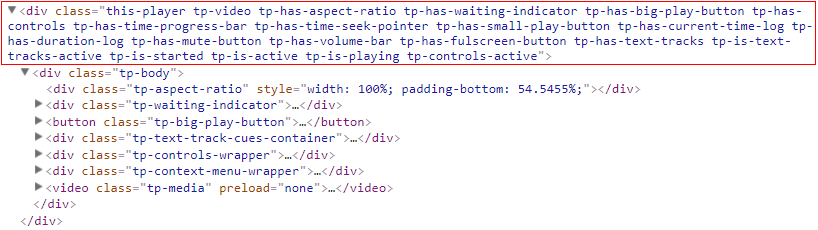
Yup that's right there are so many class names but this is for very easy styling of player. you can select any state or mode of player in CSS using this classes and style it very easily.
The list below explains which class when and why appears in main container of thisPlayer.
.this-playerThis is the main class of the player container which never changes and always is added on it.
.tp-videoAdded when it's video player - when media type is video.
.tp-audioWhen player type is audio - so when media type is audio.
.tp-is-touchscreenAdded when a device that the player is generated on has touchscreen.
.tp-is-mobile-or-tabletAdded when a device that the player is generated on is mobile or tablet.
.tp-has-builtinAdded when player has builtin option enabled. See what is builtin in thisPlayer options.
.tp-has-waiting-indicatorAdded when player has big loading/waiting indicator.
.tp-has-big-play-buttonAdded when player has big play button.
.tp-has-text-tracksAdded when text tracks is available.
.tp-text-tracks-bar-openedAdded when text tracks menu is opened.
.tp-is-text-tracks-activeAdded when text tracks is activated. When it is not turned off.
.tp-has-controlsAdded when player has controls bar.
.tp-controls-activeAdded when controls bar is active - shown.
.tp-has-time-progress-barAdded when player has time progress bar.
.tp-has-time-seek-pointerAdded when time seek pointer is added in time progress bar.
.tp-has-floating-time-indicatorAdded when player has floating time in time progress bar.
.tp-has-time-progress-bar-highlighterAdded when player has time progress bar highlighter.
.tp-has-waiting-indicator-on-time-progress-barAdded when has waiting/loading indicator in time progress bar.
.tp-has-small-play-buttonAdded when has small play button in controls bar.
.tp-has-current-time-logAdded when shows current time in controls bar
.tp-has-time-remaining-logAdded when remaining time is shown in controls bar.
.tp-has-duration-logAdded when player duration is shown in controls bar.
.tp-has-mute-buttonAdded when has mute/unmute button.
.tp-has-volume-barAdded when has volume bar.
.tp-has-volume-bar-seek-pointerAdded when has seek pointer in volume bar.
.tp-has-floating-volume-indicatorAdded when has floating volume number in volume bar.
.tp-has-volume-bar-highlighterAdded when has highlighter of volume bar.
.tp-has-fulscreen-buttonAdded when has full screen button in controls bar.
.tp-has-qualitiesAdded when there is multiple qualities available.
.tp-qualities-bar-openedAdded when qualities bar is opened.
.tp-is-playingAdded when player is playing.
.tp-volume-is-seekingAdded when volume bar is seeking.
.tp-floating-time-indicator-activeAdded when time indicator in time progress bar is active. Actually this class appears when mouse or touch is over time progress bar. Just when floating time indicator is available.
.tp-floating-volume-indicator-activeAdded when volume indicator is active in volume bar. The class appears when mouse or touch is over volume bar just if floating volume indicator is available.
.tp-time-progress-bar-highlighter-activeAdded when time progress bar highlighter is shown. The class appears when touch or mouse is over time progress bur just if highlighter of time bar is available in options.
tp-volume-bar-highlighter-activeAdded when volume bar highlighter is showm. Actually class is added when touch or mouse is over volume bar. Only if highlighter of volume bar is available!
.tp-is-mutedAdded when the player is muted.
.tp-is-fullscreenAdded when player is in full screen mode.
.tp-is-activeIf you click/touch over player it becomes active, if you click/touch outside of player it becomes not active. This class says that player is active when it is added.
.tp-controls-activeAdded when player controls bar is shown. Actually it happens when player is paused, not started or mouse is moved over player or in case of touchscreen when touch over player.
.tp-is-waitingAdded when player is waiting/loading.
.tp-is-startedAdded when player has been started playback.
.tp-has-aspect-ratioAdded when aspect ratio is enabled/added.
.tp-errorAdded when some player occurs over player.